Every episode is a station on the dial
· 7 min read
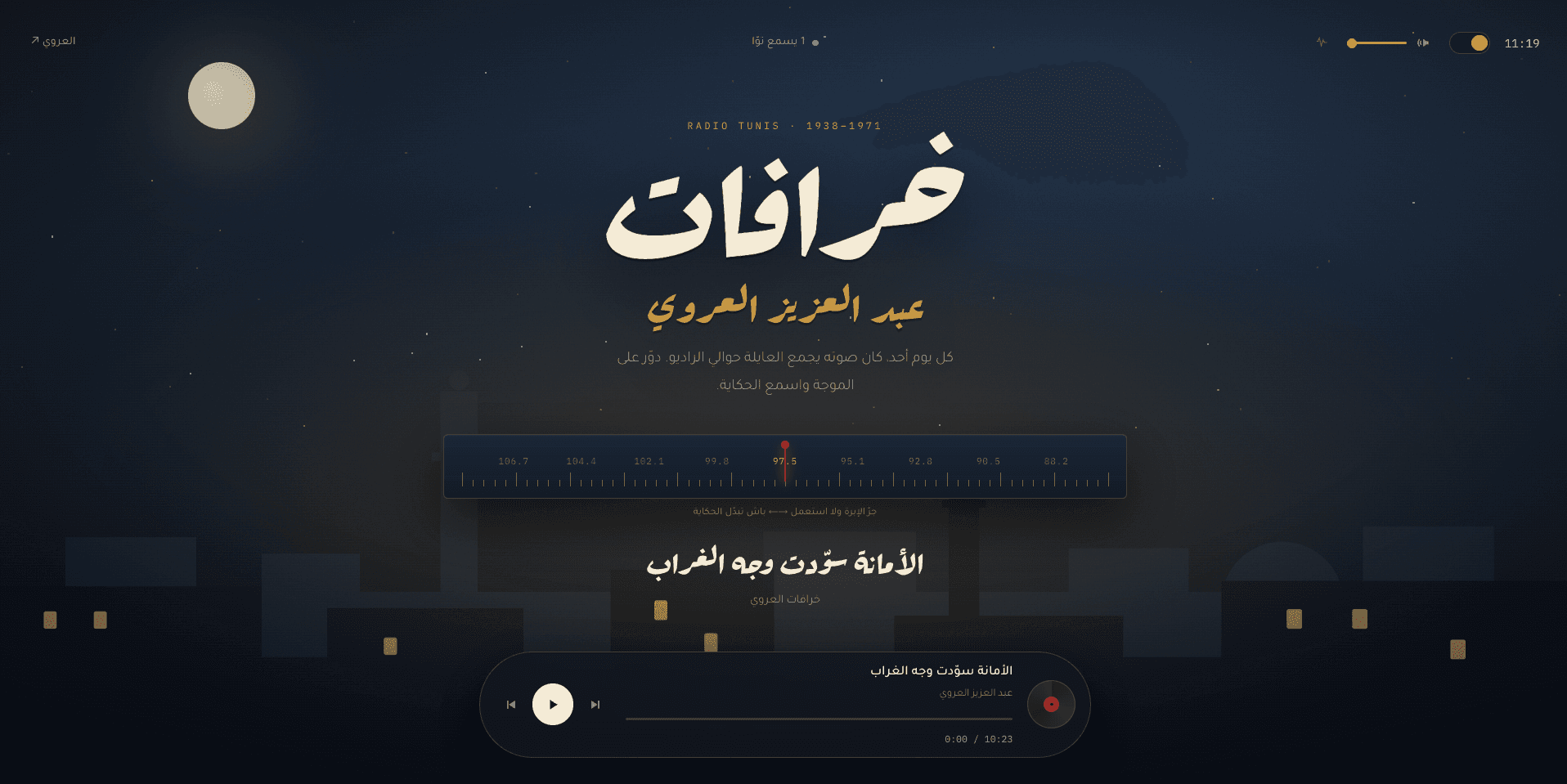
Building Aroui Radio, an archive of Abdelaziz El Aroui's خرافات where you move between episodes by dragging the needle of a tuning dial.
On this page
Abdelaziz El Aroui was the storyteller whose Sunday broadcasts on Radio Tunis gathered families around the set. Aroui Radio is an archive of his خرافات, and the public site has no episode list. The homepage is one full-screen night scene over Tunis with a vintage tuning dial: each published episode is a station, and you drag the needle to tune to it.
The design started as an HTML prototype, still in the repository, and the Next.js version is a direct port of it.
What the dial gets
The homepage is a server component. It reads the published episodes in dialOrder and passes them on as Station objects: id, slug, the Arabic title, description and collection name, frequency, duration and a playable URL. A comment on the type spells out what's left out: storage keys, play counts and unpublished rows.
Server rendering puts every title in the HTML, which is what an Arabic archive on the open web needs. The page revalidates every five minutes, and immediately when an episode is published.
A station's place on the band comes from dialOrder alone. frequency ("88.2", "91.5") is a string the schema calls purely cosmetic: the dial prints it and never measures anything with it.
The URL points straight at object storage: a public URL when the bucket has a custom domain in front of it, a presigned GET otherwise. The <audio> element never goes through Next, so range requests and seeking are the storage layer's job.
Where each station sits
Positions come from order alone:
/**
 * Where each station sits along the band, as a percentage from the *start* of
 * the dial — and the dial reads right-to-left like the rest of the page, so
 * 88.2 sits at the right edge and the band climbs leftward.
 */
export function stationPositions(count: number): number[] {
  if (count <= 1) return count === 1 ? [50] : []
  return Array.from({ length: count }, (_, i) => 8 + i * (84 / (count - 1)))
}

/**
 * Band position → CSS `left`. Everything is stored in band space (0 = lowest
 * frequency) and mirrored only at the edges, so the tuning maths never has to
 * think about which way the page runs.
 */
const toScreen = (bandPct: number) => 100 - bandPct
const fromScreen = (screenPct: number) => 100 - screenPct
However many stations there are, they're spread evenly from 8% to 92% of the band. The formula is the prototype's. The guard is new: with one station, the prototype's version divides by zero.
The dial reads right to left like the page, so the first station is at the right edge. Only toScreen and fromScreen deal with that, when drawing and when a pointer lands. Everything else, finding the nearest station included, works in band space, where 0 is the bottom of the band.
Dragging the needle
Here's the whole drag:
const nearest = useCallback(
  (pct: number) =>
    positions.reduce((best, p, i) => (Math.abs(p - pct) < Math.abs(positions[best] - pct) ? i : best), 0),
  [positions],
)

// While dragging, the highlighted station tracks the needle so the dial feels
// like it is tuning rather than snapping only at the end.
const activeIndex = dragPct === null ? index : nearest(dragPct)
const needleBandPct = dragPct ?? positions[index] ?? 50

/** Pointer x → band position, mirrored because the band climbs leftward. */
const pctFromEvent = (e: React.PointerEvent) => {
  const rect = dialRef.current?.getBoundingClientRect()
  if (!rect || rect.width === 0) return 0
  const screenPct = Math.min(100, Math.max(0, ((e.clientX - rect.left) / rect.width) * 100))
  return fromScreen(screenPct)
}

const onPointerDown = (e: React.PointerEvent<HTMLDivElement>) => {
  if (stations.length === 0 || e.button !== 0) return
  e.currentTarget.setPointerCapture(e.pointerId)
  dialRef.current?.focus()
  setDragPct(pctFromEvent(e))
}

const onPointerMove = (e: React.PointerEvent<HTMLDivElement>) => {
  if (dragPct === null) return
  setDragPct(pctFromEvent(e))
}

const endDrag = (e: React.PointerEvent<HTMLDivElement>) => {
  if (dragPct === null) return
  const landed = nearest(dragPct)
  setDragPct(null)
  e.currentTarget.releasePointerCapture?.(e.pointerId)
  onTune(landed)
}
One set of handlers
The prototype listened for mousedown, mousemove and mouseup, plus the three touch events, and put the move and end handlers on window so a drag could leave the dial. Pointer events cover mouse, touch and pen in one set. setPointerCapture replaces the window listeners: once a press lands on the dial, every move and the release come back to it, wherever the pointer goes.
e.button !== 0 stops a right-click from starting a drag. The press also focuses the dial, so you can go from dragging to the arrow keys without losing your place. And touch-action: none in the dial's CSS makes a sideways drag on a phone move the needle, not the page.
Tuning while you drag
During a drag the needle follows dragPct exactly and the lit frequency follows nearest(dragPct), so it feels like tuning rather than a slider that jumps at the end. onTune only runs on release, though, so sweeping across the band loads nothing on the way. A cancelled pointer ends the drag like a release, on the nearest station.
The snap is a transition
The glide onto the station isn't animated in JavaScript. On release, dragPct goes back to null, so in the same render the needle takes the landed station's position and loses its dragging class. The stylesheet does the rest:
.needle {
  position: absolute;
  /* … */
  transform: translateX(-50%);
  transition: left 0.45s cubic-bezier(0.22, 1, 0.36, 1);
}
.needle.dragging {
  transition: none;
}
With no transition during a drag, the needle stays under your finger. On release it eases onto the station from wherever you let go. Under prefers-reduced-motion, a global rule removes transitions and it simply jumps.
Using the dial from the keyboard
The dial is a div with role="slider" and tabIndex={0}. aria-valuenow is the station's index and aria-valuetext pairs the frequency with the Arabic title, so what gets announced is the station, not a bare number.
The arrow keys move the needle the way they point. The band climbs leftward, so Left and Up tune up, Right and Down tune down. The prototype also had Left tuning up, but on a band that climbed rightward, so the needle went against the key. Home and End go to the first and last stations, and stepping wraps round. A key press calls onTune directly, so it gets the same glide as a release.
What a tune does
Drags, arrow keys, the player's previous and next buttons and an episode running to its end all change station through one function:
const tune = useCallback(
  (next: number) => {
    if (next === index || !stations[next]) return

    // Mark where we got to before the station changes, and pick up the new
    // one wherever it was left.
    savePosition()
    pendingSeekRef.current = positionsRef.current[stations[next].slug] ?? null

    // Flush what was heard of the outgoing episode before the id changes.
    report()
    heardRef.current = 0
    sentRef.current = 0
    lastTimeRef.current = 0

    setIndex(next)
    setCurrentTime(0)
    setDuration(0)
    setNotice(null)

    // Keep the address bar on the tuned station so any share is a deep link,
    // without a router navigation that would re-render the whole scene.
    window.history.replaceState(null, '', `/h/${stations[next].slug}`)
  },
  [index, stations, report, savePosition],
)
Save, flush, then switch
Order matters here. The outgoing episode's position is saved and its listening time reported before the index changes. report reads the episode id from a ref that's only updated on render, so at this point it still names the outgoing episode. The counters are reset before setIndex, so no seconds carry over.
The incoming station's saved position, if it has one, is parked in pendingSeekRef until the new recording has loaded.
The address bar follows the needle
The last line sets the URL to /h/<slug> with history.replaceState. Nothing navigates and the scene doesn't re-render, but the address bar now holds a link to that station.
/h/[slug] renders the same scene and RadioStage with the dial already on that episode, plus its own metadata and a share card made with next/og. The card's Arabic is reordered word by word before drawing, because Satori lays words out in source order.
On first load a deep link always wins. Otherwise the dial goes back to the visitor's last station, read from localStorage.
Keeping the sound going
A new index means a new src, and an effect loads it:
// When the station changes mid-playback, load the new source and keep going.
const wasPlayingRef = useRef(false)
useEffect(() => {
  const audio = audioRef.current
  if (!audio) return
  const shouldResume = wasPlayingRef.current
  if (!station?.src) {
    audio.removeAttribute('src')
    audio.load()
    setPlaying(false)
    return
  }
  audio.src = station.src
  audio.load()
  if (shouldResume) {
    audio.play().catch(() => setPlaying(false))
  }
}, [station?.src, station?.id])

useEffect(() => {
  wasPlayingRef.current = playing
}, [playing])
The effect needs to know whether audio was playing before the switch. Reading playing directly would make it a dependency and reload the source on every play or pause, so a ref mirrors it instead.
The <audio> element is preload="none", so a new source loaded while paused fetches nothing until someone presses play. Until then the player shows the duration stored on the episode. That's why the admin reads each recording's duration on the server with music-metadata after upload.
When the metadata arrives, the parked position is applied, unless it's within eight seconds of the end. That counts as finished, and the episode starts again from the top.
Counting what was heard
Each episode's page in the admin shows how far people get before they stop. That needs a count of time actually listened, not the playback position.
The player keeps it in refs rather than state, because timeupdate fires about four times a second and nothing renders from it. Each event adds the gap since the last one to a running total, as long as the gap is positive and at most two seconds. A seek is one big jump and gets discarded, so scrubbing to the end doesn't count as a full listen. The total goes to /api/play every fifteen seconds, once more on pagehide through sendBeacon, and on every tune.
One row per listener
Listeners are told apart by an anonymous httpOnly cookie holding a random id. It isn't an account and isn't tied to anything identifying. A unique constraint allows one PlayEvent per episode and session, so the row accumulates instead of multiplying.
Two requests at once
A heartbeat and a pagehide beacon can arrive together, and both can be the first for that session. Check-then-create would race, so the route lets the constraint decide:
// Try the first-listen path optimistically. A 15s heartbeat and a pagehide
// beacon can land together, so "check then create" would race into a unique
// violation — let the constraint arbitrate instead.
try {
  await prisma.$transaction([
    prisma.playEvent.create({ data: { episodeId, sessionId, secondsHeard } }),
    // playCount is "distinct sessions", so it increments exactly once per
    // session — here, on the row's creation, not on every heartbeat.
    prisma.episode.update({ where: { id: episodeId }, data: { playCount: { increment: 1 } } }),
  ])
  return NextResponse.json({ ok: true, secondsHeard })
} catch (err) {
  if (!isUniqueViolation(err)) throw err
}

// Already listening. Monotonic: a late beacon carrying an earlier tick's total
// must not walk the number backwards.
const updated = await prisma.playEvent.updateMany({
  where: { episodeId, sessionId, secondsHeard: { lt: secondsHeard } },
  data: { secondsHeard },
})

return NextResponse.json({ ok: true, applied: updated.count > 0 })
The losing request gets a unique violation and falls through to the update, which only ever raises the number, so a late beacon carrying an older total matches no row and changes nothing. Since the play count goes up in the same transaction that creates the row, it counts each session once, however many heartbeats follow.
The admin turns those rows into an average listen, a longest listen, and the average as a share of the episode's length.
The rest of it
- Five ambience layers (radio hiss, rain, wind, sea and a brazier) synthesised in the Web Audio graph from filtered noise, so there's nothing to download and they can be layered
- Three background scenes with day and night palettes, applied by an inline script before first paint so the wrong one never flashes
- An admin that uploads straight to storage through a presigned
PUT, reads the duration on the server, and reorders the dial by drag or keyboard - Any S3-compatible storage: Cloudflare R2 in production, MinIO locally, with no code change between them
Built with Next.js 15, TypeScript, Prisma, PostgreSQL, Cloudflare R2, Auth.js and Tailwind.
What I'd change
A station's position comes from its order, but the number printed there doesn't. frequency is a stored string, and nothing keeps it in step with dialOrder.
The seed and the bulk importer hand out evenly rising values, and from then on it drifts. The admin's drag-to-reorder only writes dialOrder, so with the seed data, moving the last episode to the front makes the band read 104.7, 88.2, 91.5 from the right. The new-episode form suggests the previous frequency plus 3.3, so after the seed's six episodes the seventh is offered 108.0 and the eighth 111.3, past the top of a real FM band. Short of re-running the seed, only the importer's --prune-missing brings the numbers back in line.
I'd stop storing the label and compute it like the position, from the station's place in the order, with the frequencyFor function the importer already has. A station's number would shift as the archive grows. For a label the schema already calls cosmetic, that's a fair price.
Was this any good?