Pricing a shipping container
· 8 min read
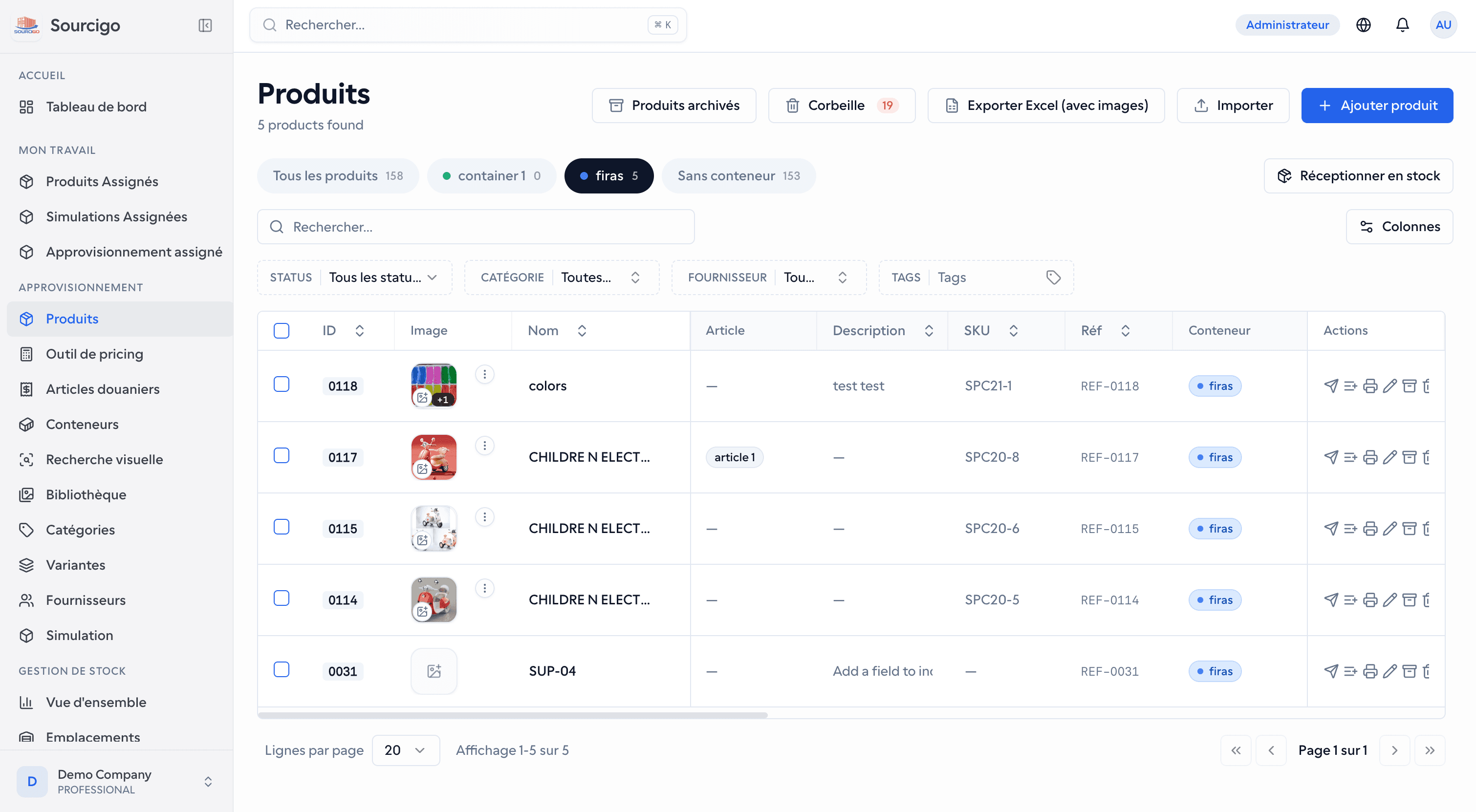
On Sourcigo, working out what a single imported product actually cost turned out to be the core of the system.
Sourcigo is a platform for importers who buy goods in China and sell them in local markets. It covers suppliers, containers, customs duties, stock and point of sale. This post starts from a question that sounds simple: what did one product actually cost?
I wasn't the only developer on it. A teammate laid the foundations and wrote most of the API. Some of the code below is theirs or shared, so I'll say whose is whose as I go.
One container, many products
A container arrives with dozens of different products, and its local charges come as one total. How much of that total should each product carry?
Before containers had their own charges, every row in the pricing tool took its charges from the same settings: a percentage of the row's own cost, or a fixed amount per unit. A fixed amount charges a cheap item as much per unit as an expensive one. A percentage ignores what the container actually cost.
The client asked for value share instead: each product carries the same share of the container's charges as it has of the container's value. Here it is in the pricing tool:
export const lineValue = (l: ContainerLine, fallbackCny?: number | null) => {
  const ppc = l.product.piecesPerCarton || 1;
  const cartons = moqCartons(l.product.moq, ppc);
  const pieces = cartons * ppc;
  const unit = l.product.unitPriceCny || fallbackCny || 0;
  return { cartons, ppc, pieces, value: unit * pieces };
};
// …
    containerIds.forEach((id, i) => {
      const lines = lineQueries[i]?.data;
      const chargesTnd = chargeQueries[i]?.data?.chargesTnd ?? null;
      if (!lines) return;
      const total = lines.reduce(
        (sum, l) => sum + lineValue(l, typedCny.get(l.product.id)).value,
        0,
      );
      const byProduct = new Map<string, RowAllocation>();
      for (const l of lines) {
        prices.set(l.product.id, l.product.priceUsd ?? null);
        const { cartons, ppc, pieces, value } = lineValue(l, typedCny.get(l.product.id));
        infos.set(l.product.id, { moq: cartons, piecesPerCarton: ppc, pieces });
        const x = total > 0 ? value / total : 0;
        byProduct.set(l.product.id, {
          chargesTnd: chargesTnd ?? 0,
          x,
          pieces,
          perUnit: chargesTnd != null && pieces > 0 ? (chargesTnd * x) / pieces : 0,
        });
      }
      map.set(id, { chargesTnd, byProduct });
    });
Working out each share
A product's value is its ¥ unit price times its pieces, which are its MOQ in cartons times the pieces per carton (the client's rule, fed by moqCartons). x is that value divided by the container's total value, which counts every product in the container, not just the rows on screen. The per-unit charge is the container's charges times x, divided by the product's pieces.
Since every share comes from the same total, the shares add up to one, and as long as at least one product has a price, the charges handed out add up to what the container cost. The container itself only stores that charges total, as chargesTnd. The browser works out the split from each container's lines and charges, fetched in parallel, and shows each row's share under its charge as x = …% so the number can be checked.
Two prices for one product
The share reads the ¥ price from the product catalogue. A product imported without one had a value of zero, so it got no charges at all, even if the user had typed a purchase price into its pricing-tool row. A teammate later fixed that. lineValue now falls back to the typed price (fallbackCny, fed from typedCny) in the container's total as well as in each line, so the shares still add up to one. A catalogue price still wins where there is one.
Customs duty
Customs duty isn't one percentage applied once. Products in a container are assigned to customs articles, each with an ordered list of rates, and by default each rate applies to the running total: the base plus the duties so far. That's how the client's own spreadsheet worked, and the tests reproduce its numbers.
The cascade itself was a teammate's code. I added a way for a single rate to apply to something other than the running total, and a final step for AIR:
export function calculateDuty(
  base: number,
  rates: readonly number[],
  bases: readonly (RateBase | string)[] = [],
): DutyBreakdown {
  const start = Number.isFinite(base) ? base : 0;
  const steps: DutyStep[] = [];
  let running = start;

  rates.forEach((raw, index) => {
    const rate = safeRate(raw);
    const mode = bases[index];
    const applyTo =
      mode === 'DUTIES' ? running - start : mode === 'BASE' ? start : running;
    const duty = applyTo * rate;
    running += duty;
    steps.push({ index, rate, duty, runningTotal: running });
  });

  return {
    base: start,
    steps,
    totalDuty: running - start,
    finalCost: running,
    effectiveRate: start > 0 ? (running - start) / start : effectiveArticleRate(rates, bases),
  };
}

/**
 * Appends the article's AIR (avance sur l'impôt sur le revenu) as a final
 * TOTAL-mode step — applied last, on the grand total (base + all duties).
 * null/0 → no AIR for this article.
 */
export function ratesWithAir(rates: readonly number[], airRate?: number | null): number[] {
  return airRate && airRate > 0 ? [...rates, airRate] : [...rates];
}
Rates that don't compound
If every rate compounds, their order makes no difference. The effective rate is the product of (1 + r), minus one, and multiplication doesn't care about order.
Then the client corrected the cascade: not every rate compounds. One 3% applies only to the duties, leaving out the base. AIR, the advance on income tax, applies last, to the grand total, and only some articles have it. The engine also allows a rate on the pre-duty base alone. Once a rate can apply to the duties so far, its position changes the result, because at step four there's more duty behind it than at step two.
So each rate carries a mode: TOTAL, DUTIES or BASE. A missing mode means TOTAL, so every existing article and every test built from the client's spreadsheet came out unchanged. AIR isn't a mode: ratesWithAir appends it to the end of the list, so it always comes last. The tests pin a reference case: a base of 12 dinars with 43%, 1% and 19% on the running total, 3% on the duties and AIR at 10% comes to 10.97 in duty, an effective rate of 91.43%. One wrong mode would change the cost of every product on that article.
One function on both screens
The duty summary in the API and the pricing tool in the browser both call calculateDuty from the shared package. For a while they still disagreed, because they fed it different bases: the tool used the ¥ purchase cost converted to dinars, and the summary used the product's dollar price times the USD rate. I changed the tool to use the summary's base:
  // One duty figure, per the client. With an article, the base is the product's
  // $ price × the article's USD rate — the SAME maths as the duty summary, so
  // both screens always agree. Without an article: douaneMaxPercent fallback.
  let douane: number;
  let articleRate: number | null = null;
  if (article) {
    const rates = ratesWithAir(article.rates, article.airRate);
    const bases = article.rateBases ?? [];
    articleRate = effectiveArticleRate(rates, bases);
    if (priceUsd === null) {
      douane = 0; // known but unpriced — the summary counts it as 0 until $ is typed
    } else {
      const usdRate = Number(article.usdToTndRate ?? settings.usdToTndRate) || 0;
      const base = priceUsd !== undefined ? priceUsd * usdRate : costTnd;
      douane = calculateDuty(base, rates, bases).totalDuty;
    }
  } else {
    douane = (costTnd * Number(settings.douaneMaxPercent)) / 100;
  }

  // Container allocation first: the container's total charge split by value share
  // (x = product value / container value), divided by the product's pieces.
  // Without a container: PERCENT mode is % of the cost; FIXED mode is the flat
  // amount plus the percentage OF THAT FLAT AMOUNT: fixe × (1 + %).
  const fixedCharge = Number(settings.chargesFixed) || 0;
  const charges = allocation
    ? allocation.perUnit
    : settings.chargesMode === 'FIXED'
      ? fixedCharge + (fixedCharge * Number(settings.chargesPercent)) / 100
      : (costTnd * Number(settings.chargesPercent)) / 100;
priceUsd has three states on purpose. A number is the real base. null means the product is known but has no dollar price yet, so the duty is zero, which is how the summary counts it. undefined means the tool hasn't found the product on any container line, and only then does it fall back to the old base.
The charge from the first section comes straight after the duty. Both go into the row's total cost, and the row's verdict, profitable or not, is worked out against that total.
Excel exports
The client already worked in spreadsheets, so the exports give them Sourcigo's numbers in the form they're used to. The products list, the pricing tool and a simulation's product list can all be exported to Excel with product photos in the sheet.
The first products export, photos included, was a teammate's work. When I came to it, it was failing for three separate reasons: two in the export itself, and one in the permission layer, which comes up in the next section.
Photos Excel will open
Excel only renders PNG, JPEG and GIF, and an image's declared type has to match its bytes. The export guessed the type from the URL, so a WebP photo went in labelled as PNG and Excel rejected it. Rather than guess better, every image now goes through sharp and comes out as a small JPEG, so the declared type is always true:
/**
 * Excel only renders png/jpeg/gif, and the declared extension must match the
 * actual bytes — source images may be WebP, mis-labelled, or huge photos.
 * Re-encode everything to a small white-backed JPEG so the workbook is always
 * valid and stays lightweight. Returns null for undecodable data (skip image).
 */
export async function normalizeImageForExcel(buffer: Buffer): Promise<Buffer | null> {
  try {
    return await sharp(buffer)
      .rotate()
      .resize(160, 160, { fit: 'inside', withoutEnlargement: true })
      .flatten({ background: '#ffffff' })
      .jpeg({ quality: 80 })
      .toBuffer();
  } catch {
    return null;
  }
}
rotate() with no angle applies the photo's EXIF orientation, and flatten puts transparent images on white. A photo that can't be decoded is skipped instead of failing the whole file.
The second problem was time. Images were fetched one after another, each with a five-second timeout, and large exports on the deployed API ran past the gateway timeout and failed with a 504. A small mapWithConcurrency helper now fetches and re-encodes them eight at a time.
Rendered on the server
The pricing tool's Excel export used to be written in the browser, with a spreadsheet library that can only write cell values, not pictures. I moved it to the API. Rows can be unsaved drafts, so the browser still builds the finished cells and sends them with the columns the user ticked, in the table's order. The server only lays them out and adds the photos:
    const images =
      imageIndex >= 0
        ? await mapWithConcurrency(rows, IMAGE_CONCURRENCY, (r) =>
            resolveImageForExcel(r.imageUrl),
          )
        : [];

    rows.forEach((row, i) => {
      const excelRow = sheet.addRow(
        columns.map((c) => (c.key === 'image' ? '' : (row.values?.[c.key] ?? ''))),
      );
      if (imageIndex < 0) return;

      const buffer = images[i];
      if (buffer) {
        const imageId = workbook.addImage({
          buffer,
          extension: 'jpeg',
        } as unknown as Parameters<ExcelJS.Workbook['addImage']>[0]);
        sheet.addImage(imageId, {
          tl: { col: imageIndex, row: excelRow.number - 1 },
          ext: { width: IMAGE_SIZE, height: IMAGE_SIZE },
        });
      }
      // Row height is in points: 80px * 0.75 = 60pt, plus a little padding.
      excelRow.height = IMAGE_SIZE * 0.75 + 6;
    });
Each picture is anchored to its row's photo cell using the photo column's index, so the user can put that column anywhere. A simulation's product list got the same server-side export, while the pricing tool's CSV export stays in the browser.
Prices some roles can't see
Roles in Sourcigo can be denied individual fields, not just whole screens. A role without products:field:sellingPrice still gets the product, with the selling price set to null. The permission system and the interceptor that does the masking were a teammate's. My part was at the edges, where the mask didn't reach.
The first edge was what broke the exports. The interceptor copied every response with an object spread before masking it, and a file download is an object too. Spreading Nest's StreamableFile stripped its class, so Nest serialised it as JSON and the downloaded .xlsx was JSON text. File responses now pass through untouched.
The second was the export's contents. A file doesn't go through the JSON mask, so the products export now blanks the sensitive columns itself:
/**
 * Columns carrying (or derived from) a sensitive product field. Exports must
 * honour the same field permissions as the API reads — otherwise a role that
 * can't see prices on screen could still download them.
 */
const SENSITIVE_COLUMNS: Record<string, string[]> = {
  'products:field:unitPriceCny': ['unitPriceCny', 'amount'],
  'products:field:landingCostPerUnit': ['landingCostPerUnit'],
  'products:field:sellingPrice': ['sellingPrice'],
  'products:field:retailPrice': ['retailPrice'],
  'products:field:wholesalePrice': ['wholesalePrice'],
  'products:field:profitMargin': ['profitMargin'],
  'products:field:customsDutyRate': ['customsDutyRate'],
};

/** Column keys the given permissions may not export. */
export function maskedColumnKeys(permissions: string[]): Set<string> {
  const masked = new Set<string>();
  for (const [permission, keys] of Object.entries(SENSITIVE_COLUMNS)) {
    if (!hasPermission(permissions, permission)) keys.forEach((k) => masked.add(k));
  }
  return masked;
}
amount sits under the unit price because it's derived from it: unit price times quantity. Hiding the price but not the amount would give the price away.
The third was depth. The mask handled a response and the items of its data list but nothing deeper, and a product's variant combinations carry their own selling price. I made it recurse. My first version walked into every object, including Prisma's Decimal values, and spreading one of those breaks it. Prices came back as {s,e,d} instead of numbers, and the edit form showed them empty. I'd guarded Date and Buffer and missed Decimal. A teammate fixed it by recursing into plain objects only.
How it's built
- A pnpm and Turborepo monorepo, with a shared package for code both sides need, including the duty maths and the permission list
- A NestJS API over PostgreSQL with Prisma: 49 models and more than sixty migrations
- Hexagonal layers for the core records (domain entities, repository ports, use cases and Prisma adapters), while the pricing and customs modules are plain NestJS services over Prisma
- A React dashboard, on Vite with TanStack Query and Table, and a Flutter app, both on the same API
- Role-based access with field-level masking
- AI visual product search, and supplier details read from business-card photos
Most of that is a teammate's work. The monorepo and the API's layering were there from the first commit, and the permission system and the AI features are theirs too. My own work is spread across the platform, and this post covers the parts closest to what a product cost.
What I'd change
Every share depends on the piece count from moqCartons, and that function has to guess. Its own comment says the web form stores MOQ in pieces and the CSV import stores it in cartons, so any MOQ at least as large as the pieces per carton is read as pieces. A CSV product with an MOQ of 20 cartons of 12 pieces would be read as 20 pieces and rounded down to one carton. It took four commits in under an hour to settle on the current rule. I'd store MOQ in one unit, migrate the existing products and delete the guess.
I'd also move the split out of the React hook and into the shared package, next to calculateDuty. The API only stores a container's total, so the value share exists nowhere but the browser, and anything else that needs it, like the mobile app or a server-side report, would have to rebuild it. The duty maths already shows how it should work: one function, called on both sides.
Was this any good?